

- Home
- Download
WPT Global Download for Android, iPhone, PC and Mac
You need the app to play, because WPT Global has no browser version. Android uses an official APK, Windows and Mac use installers from WPT Global's own servers, and the iPhone app is listed only in some App Stores. On the English invite page you download first, then create your account inside the app.
Our invite code is coming soon. Signing up through this button still gets you the official welcome package; once published, the download links from this page carry the code.
Where are the official WPT Global downloads?
The four buttons below point to WPT Global's own servers and its App Store listing: the Android APK, the iOS app, and the Windows and Mac installers. None of them is a third-party mirror. The invite page's Download WPT Global button serves the same Android, Windows and Mac files, and once our code is published, those links carry it.
All four links point to installers on WPT Global’s own domains; once our invite code is published they carry it automatically. The App Store listing is not available in every country.
| Device | Where it comes from | Minimum system | Download size |
|---|---|---|---|
| Android phone | Official APK | Android 8.0 | About 281 MB |
| iPhone / iPad | App Store in some countries, or WPT Global's installer page | iOS 13.0 | About 620 MB |
| Windows PC | Official .exe installer | Windows 10 | About 514 MB |
| Mac | Official .dmg installer | macOS 10.14 | About 693 MB |
WPT Global's help center sets the same hardware floor for every platform: 500 MB of free storage and 3 GB of RAM, with 4 GB recommended. For iPhone it gives iOS 10 as the minimum while the App Store listing says iOS 13.0, so go by the App Store. The Windows, Mac and iPhone downloads are already bigger than that 500 MB floor, so leave at least 1 GB free.
Do you sign up before or after installing?
After. WPT Global's English invite page only offers downloads, so you install first and register inside the app, which is also where the referral code goes. Register once only: the same account works on every device, and registering again on a second device would break the one-account rule. These four steps are the same everywhere; the sections for each device follow.
Step 1Open the WPT Global invite page
Tap any sign-up button on this site. It opens WPT Global's English invite page with our code in the address; the page lists the welcome offer and has one blue Download WPT Global button.
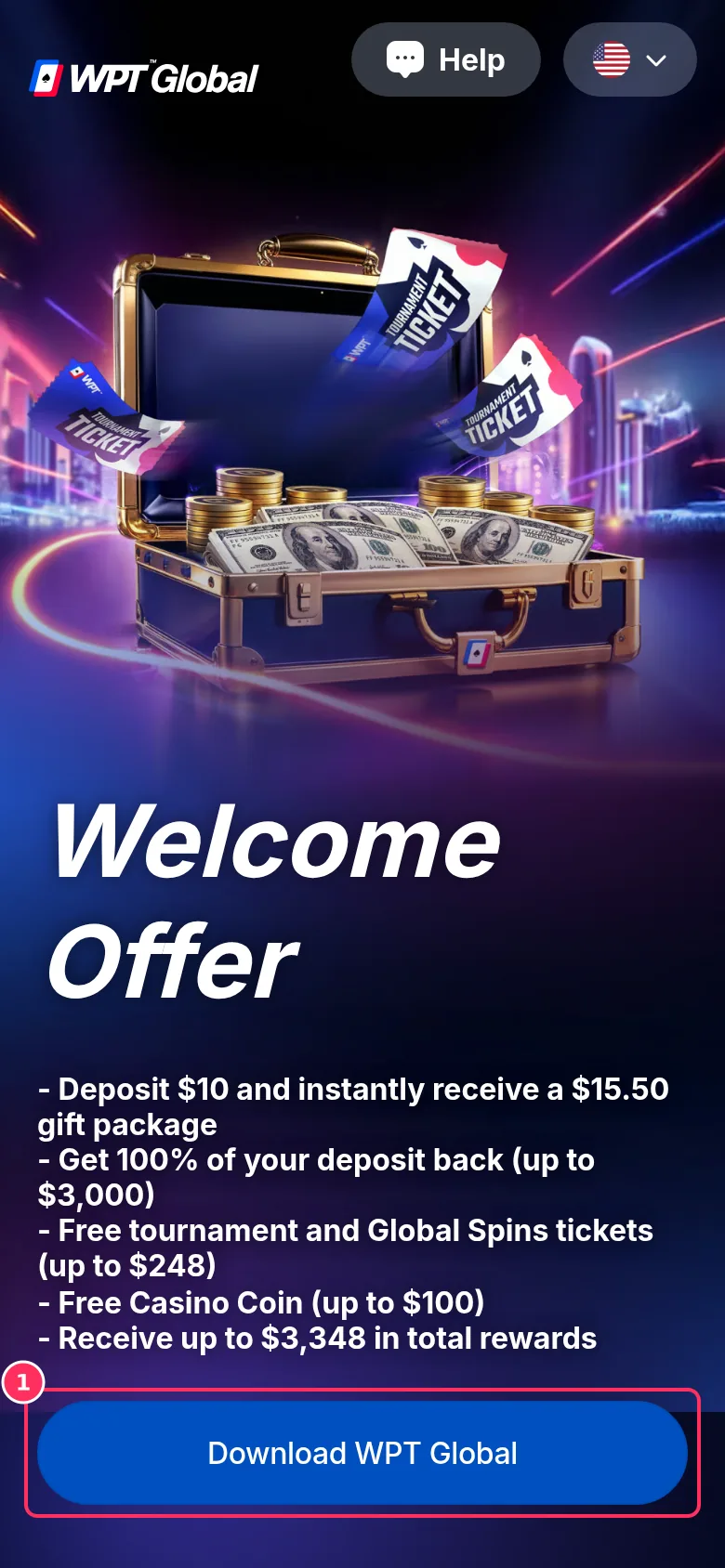
On Android, tapping Download WPT Global (box 1) downloads the official WPTG.apk installer (about 281 MB). Step 2Pick your device and download
That button serves the file for the device you are on: an APK on Android, an .exe on Windows, a .dmg on Mac. WPT Global's official download page offers the same installers. iPhone works differently; see the iPhone steps below.
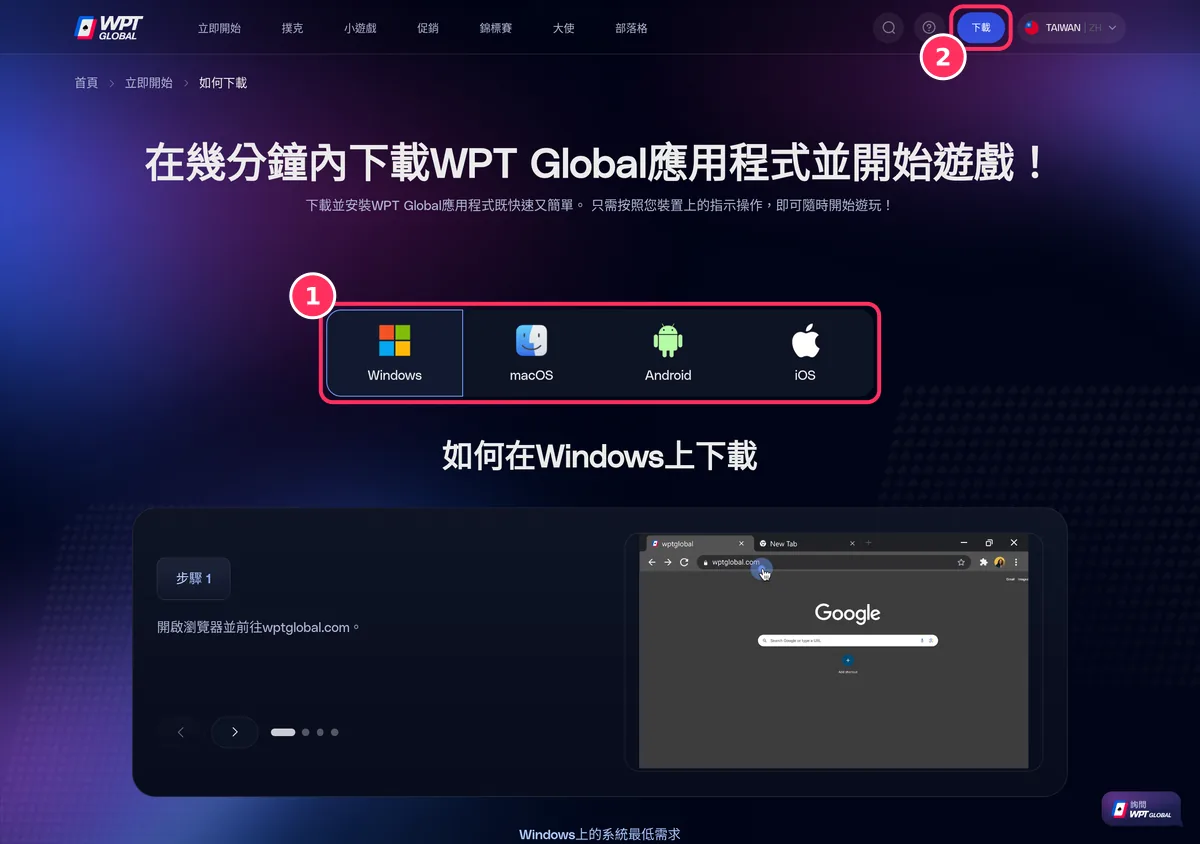
WPT Global's download page: box 1 switches between the platform guides, and Download (box 2) gives a computer the .exe or .dmg installer. Step 3Install the app, open it and tap Register
Follow your device's steps below, then open WPT Global and choose Register; on a computer it sits under Login in the guest lobby. Your account is created in the app, not on the invite page.
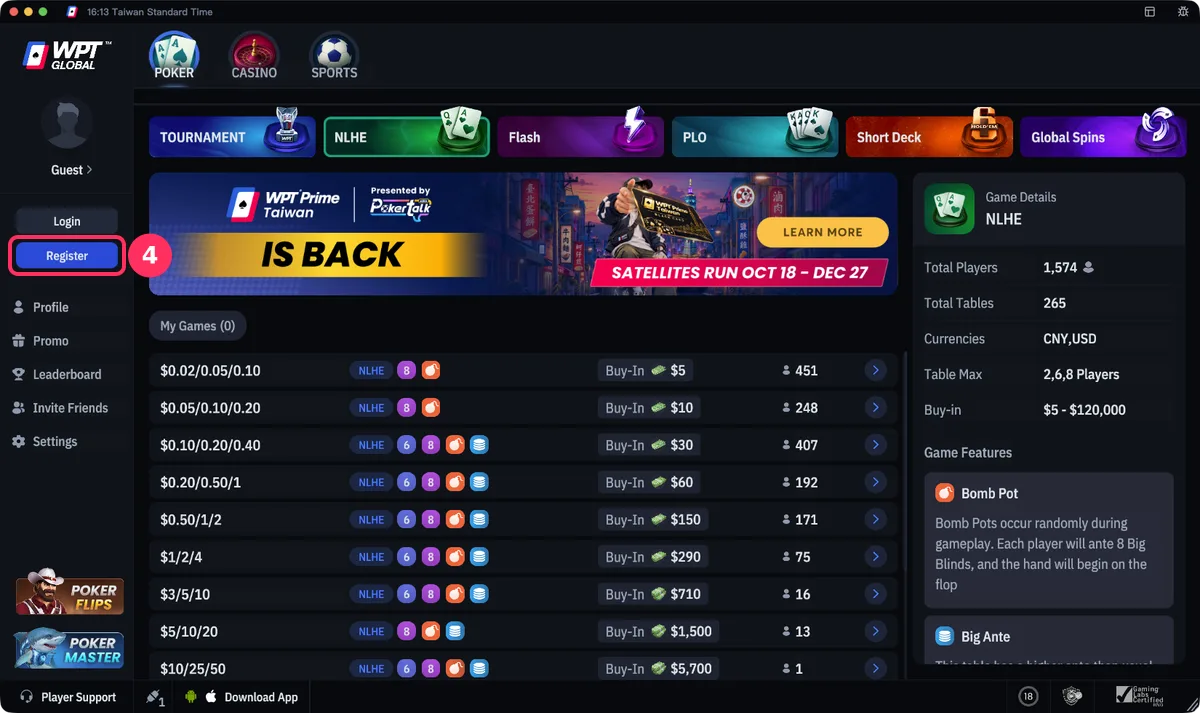
The app opens in the guest lobby; tap Register (box 4) to create your account, or Login if you already have one. Step 4Fill in the form and check the Referral code is Invite code coming soon
Enter your email, a password and a username. Leave Bonus code empty unless you have a promotion code, and if the Referral code field is blank, type our code in. Submit, verify your email and log in.
Which version should you choose?
If you have the choice, Android and the desktop clients are the most direct, because both download straight from WPT Global's servers and the invite page's link passes the referral code to them. The iPhone app depends on your country's App Store. Whichever you start with, you can add the others later and log in with the same account.
How do you install WPT Global on Android?
The Android app is an APK from WPT Global's own domain, downloads.wptglobal.com. Google Play has no official WPT Global app in many regions and look-alikes with similar names exist, so don't install from Play Store search results.
Step 1Tap Download WPT Global on the invite page, or the Android button above
Both give you the official WPTG.apk, about 281 MB, so use Wi-Fi if you can. Chrome warns that this type of file can harm your device; it shows that for every APK, so confirm the download.
On Android, tapping Download WPT Global (box 1) downloads the official WPTG.apk installer (about 281 MB). Step 2Allow installs from your browser
Android blocks the first APK you open. Go to Settings › Apps › Special app access › Install unknown apps and allow Chrome or whichever browser you used. Menu names vary by brand, and you can switch it off again after installing.
Step 3Open WPTG.apk and tap Install
Open the file from the notification bar or the Files app, tap Install and wait for it to finish.
Step 4Open the app and register
Tap Register and check the Referral code field before you submit, as in step 4 above. Your phone needs Android 8.0 or later, 3 GB of RAM (4 GB recommended) and 500 MB of free storage.
Note: Google Play has no official WPT Global app in many regions, and look-alikes turn up in search. In one regional store we checked, an app called WPT Global Real Online Poker, listed by a developer named SCI CAROLE, had nothing to do with WPT Global. Don't install it, and never type your login details into it. After the official APK is installed, consider switching the install-unknown-apps permission off again.
How do you install WPT Global on iPhone or iPad?
Check your own App Store first: the iOS app is listed only in some countries, and Canada is confirmed. When we tested on November 3, 2026, the invite page's iPhone link returned a page-not-found error, and the iPhone button on WPT Global's official download page led to an installer page outside the App Store. Both routes are below so you can decide.
Step 1Search your own App Store first
WPT Global's download page tells iPhone users to open the App Store. Search for WPT Global: Play Poker Online; it is free, about 620 MB and needs iOS 13 or later. If your country's store lists it, install it there and go to step 4.
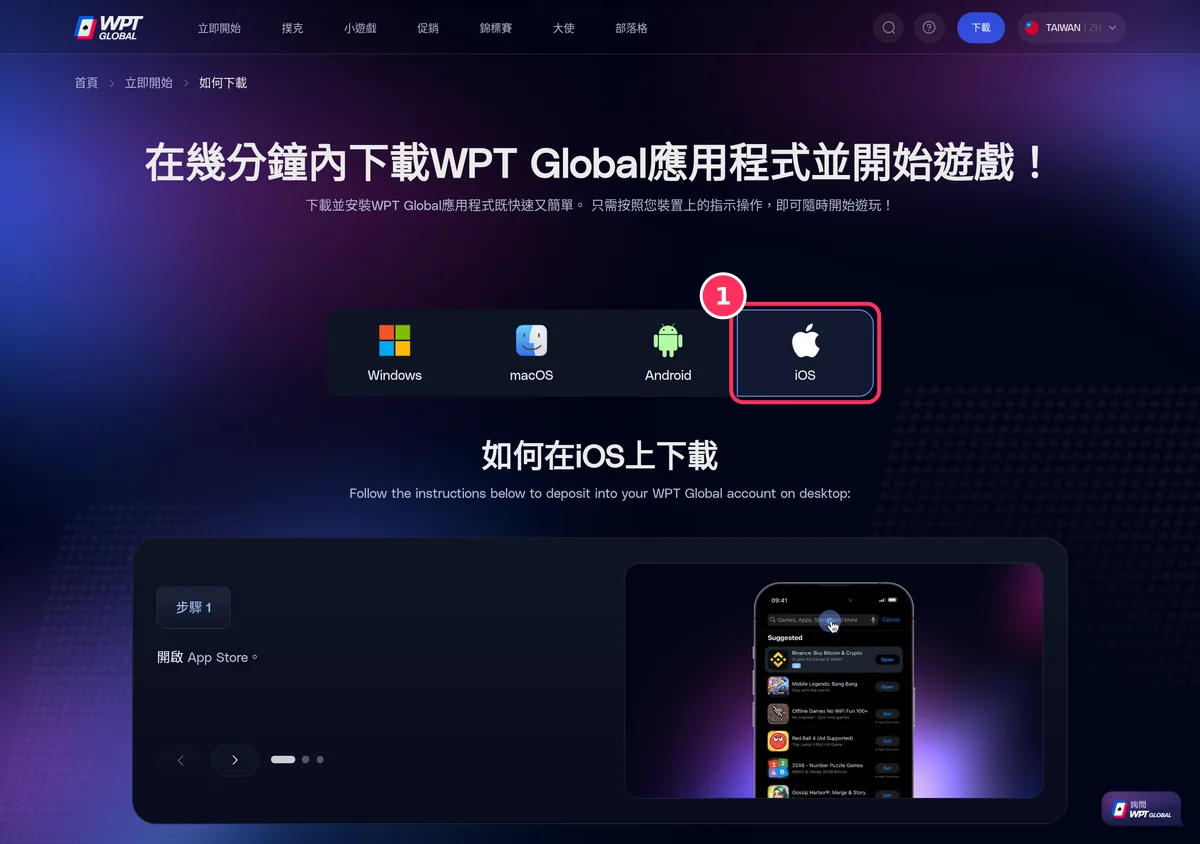
The iOS tab (box 1) says to open the App Store, but the app is listed only in some countries' stores, so search yours first. Step 2Not listed? Know what the installer page is
On an iPhone, the Download button on WPT Global's official download page opens an installer page on wpt-download.com. It looks like the App Store but is not: its star ratings and chart positions are not App Store figures. After installing you must trust the developer certificate under Settings › General › VPN & Device Management. Whether to use this route is your call.
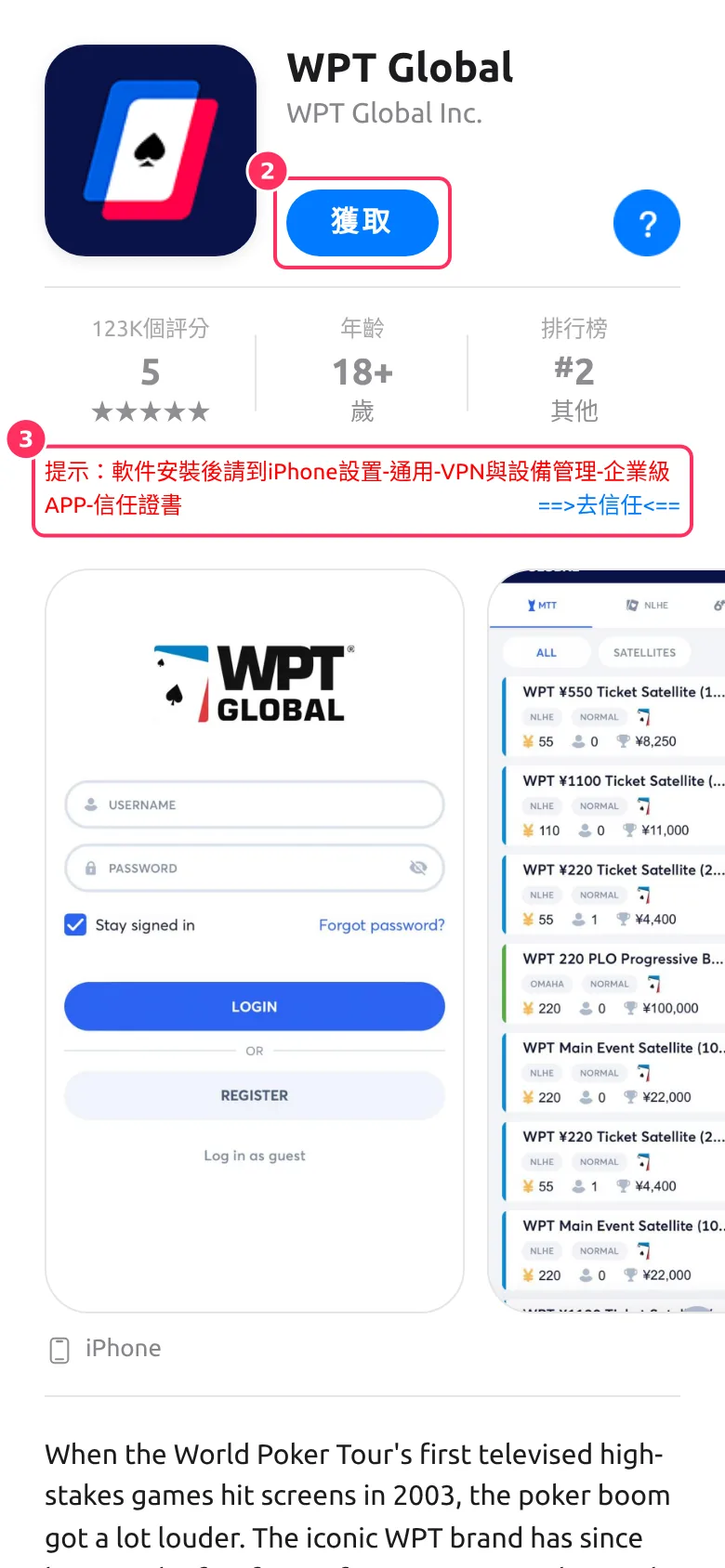
Get (box 2) installs the app; afterwards trust the certificate under Settings › General › VPN & Device Management, as box 3 says. This is not the App Store, and its ratings are not App Store ratings. Step 3Recognise the genuine App Store listing
The real listing is WPT Global: Play Poker Online, developer WPT Global, free and about 620 MB; it is confirmed in Canada's store. Ignore similarly named apps from other developers. If neither route works for you, use the Android app or a computer with the same account.
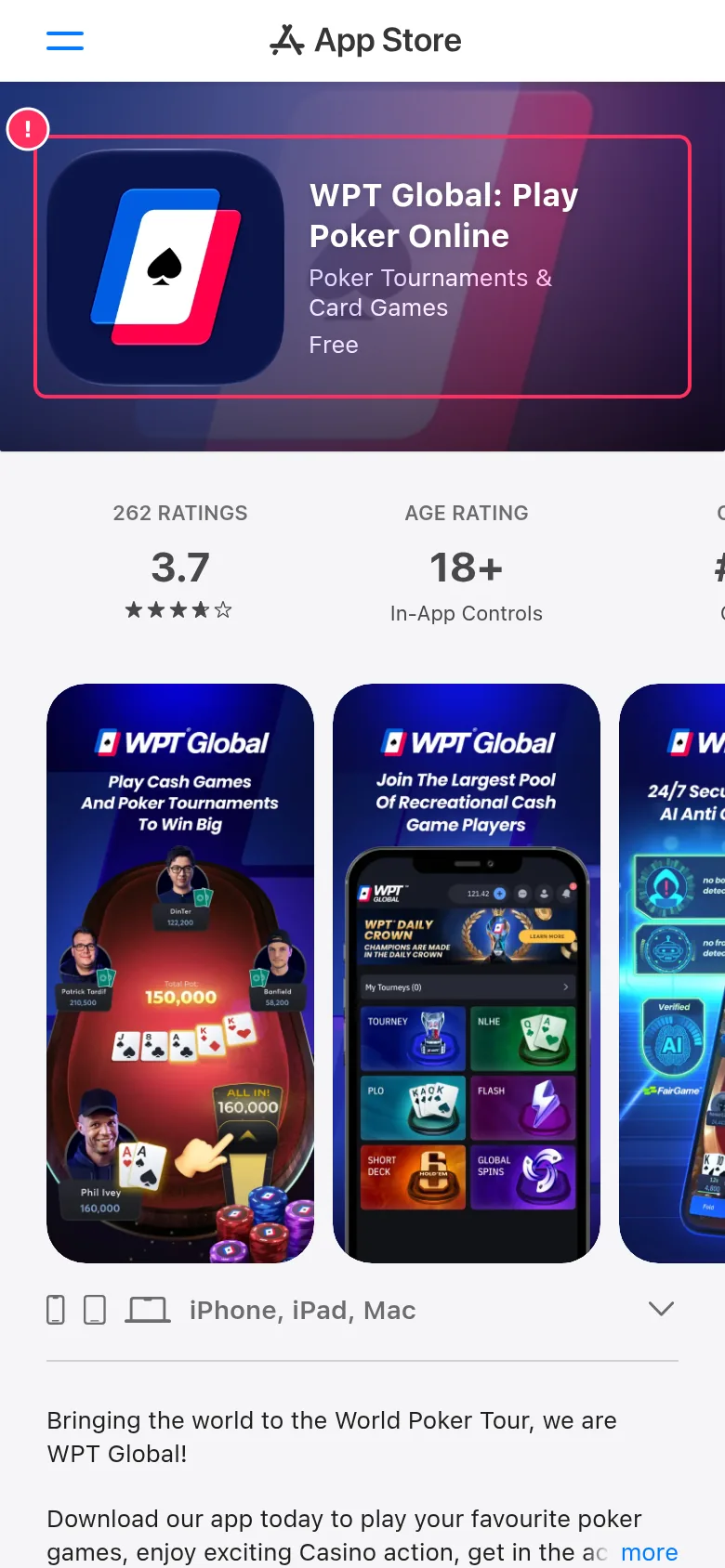
The official iOS app in Canada's App Store: developer WPT Global, free, 619.5 MB. Step 4Open the app and register
Tap Register and fill in the form. An iPhone install may not carry our code, so check the Referral code field and type the code in if it is empty, as in step 4 above.
Two routes exist, and we describe both so you can choose. Where the App Store has the app, its seller is Kashxa Limited, the company that acts as WPT Global's payment agent. The installer page outside the App Store only works after you trust a developer certificate on your phone. If you take that route, start from WPT Global's official download page, and never trust a certificate offered by any other site. If neither route works, log in to the same account on Android or a computer.
How do you install WPT Global on Windows?
The desktop client is an official installer for Windows 10 or later, served from desktop.wptglobal.com. There is no browser version.
Step 1Tap Download WPT Global on the invite page, or the Windows button above
The installer, wpt-global-desktop.exe, is about 514 MB. When the download finishes, open it from your browser's downloads list.
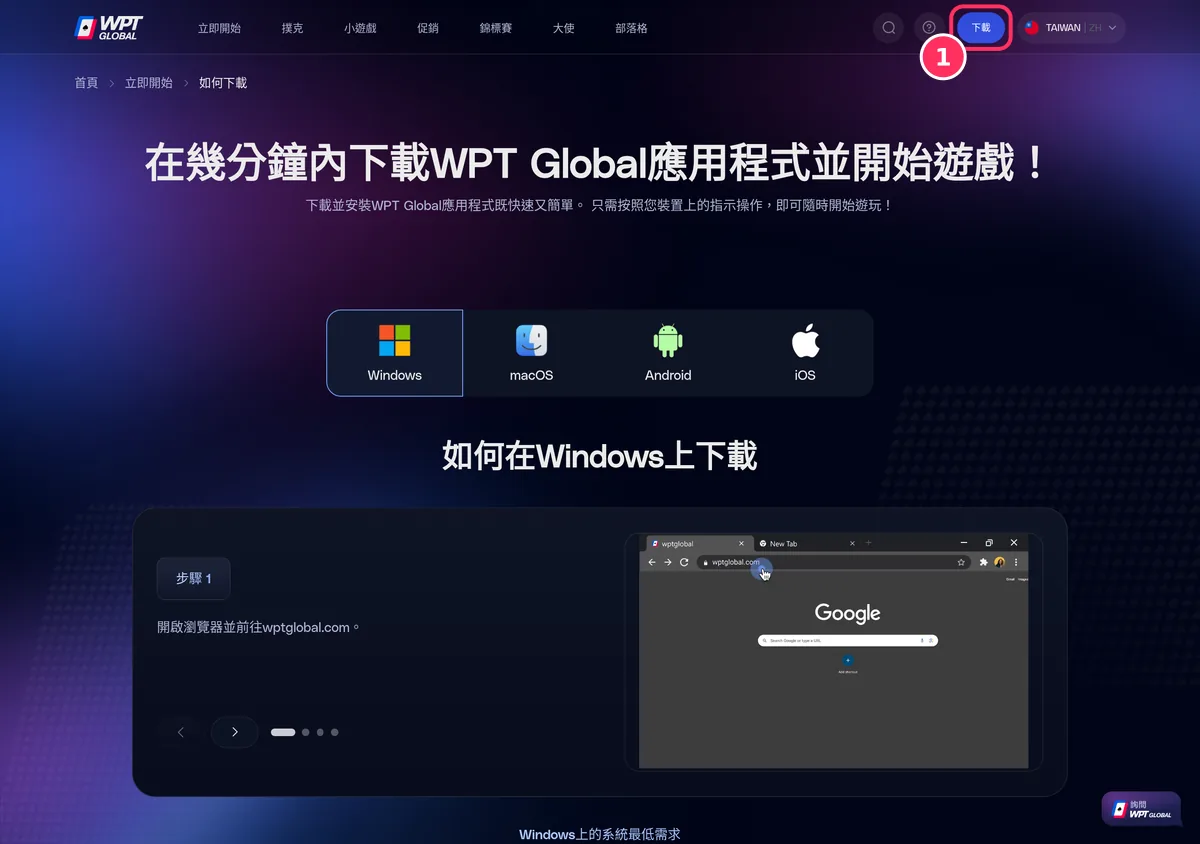
On a Windows PC, Download (box 1) downloads wpt-global-desktop.exe. Step 2If SmartScreen appears, choose More info, then Run anyway
Windows shows this warning for many newly released programs. Only do it for a file that came from desktop.wptglobal.com.
Step 3Click through the setup wizard
Accept the defaults and let the installer finish; WPT Global then opens like any other Windows program.
Step 4Open the client and register
The first launch opens a guest lobby in English. Choose Register on the left to create your account, or Login if you already registered on another device. The Windows and Mac clients look the same.
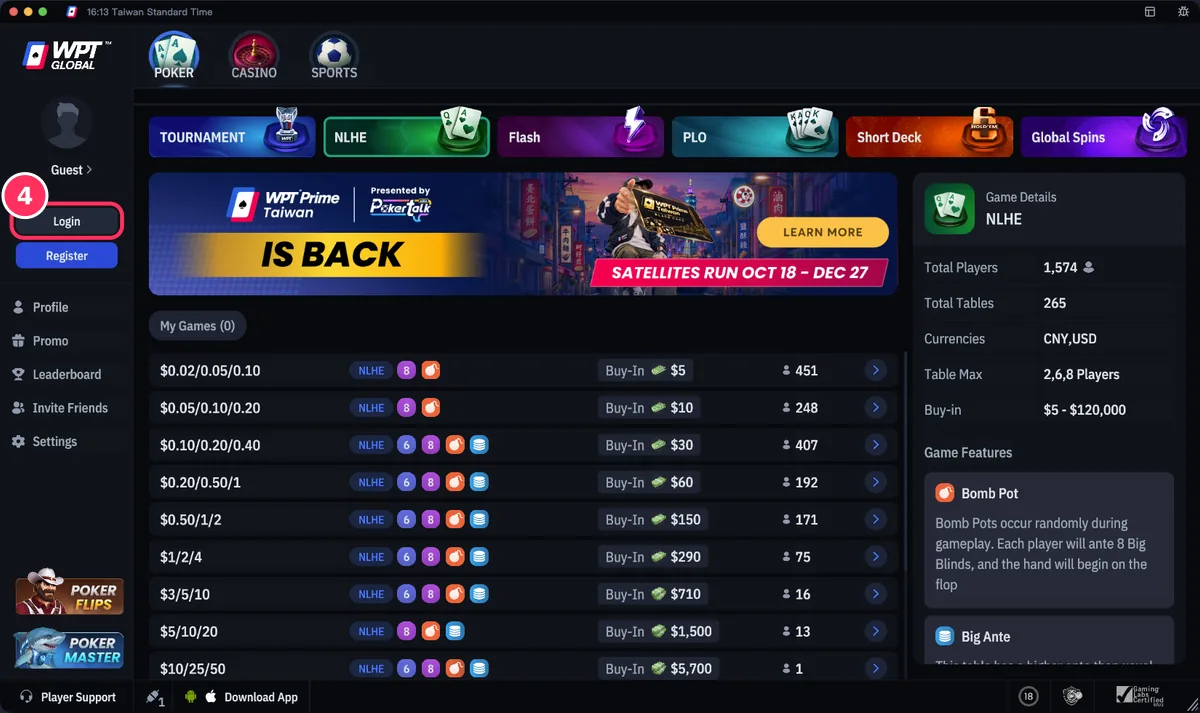
The app opens in the guest lobby; tap Register, just below box 4, to create your account, or Login (box 4) if you already have one.
How do you install WPT Global on a Mac?
The Mac client needs macOS 10.14 or later and installs like any other Mac app.
Step 1Tap Download WPT Global on the invite page, or the macOS button above
The disk image, wpt-global-desktop.dmg, is about 693 MB. Double-click it in Downloads to open it.
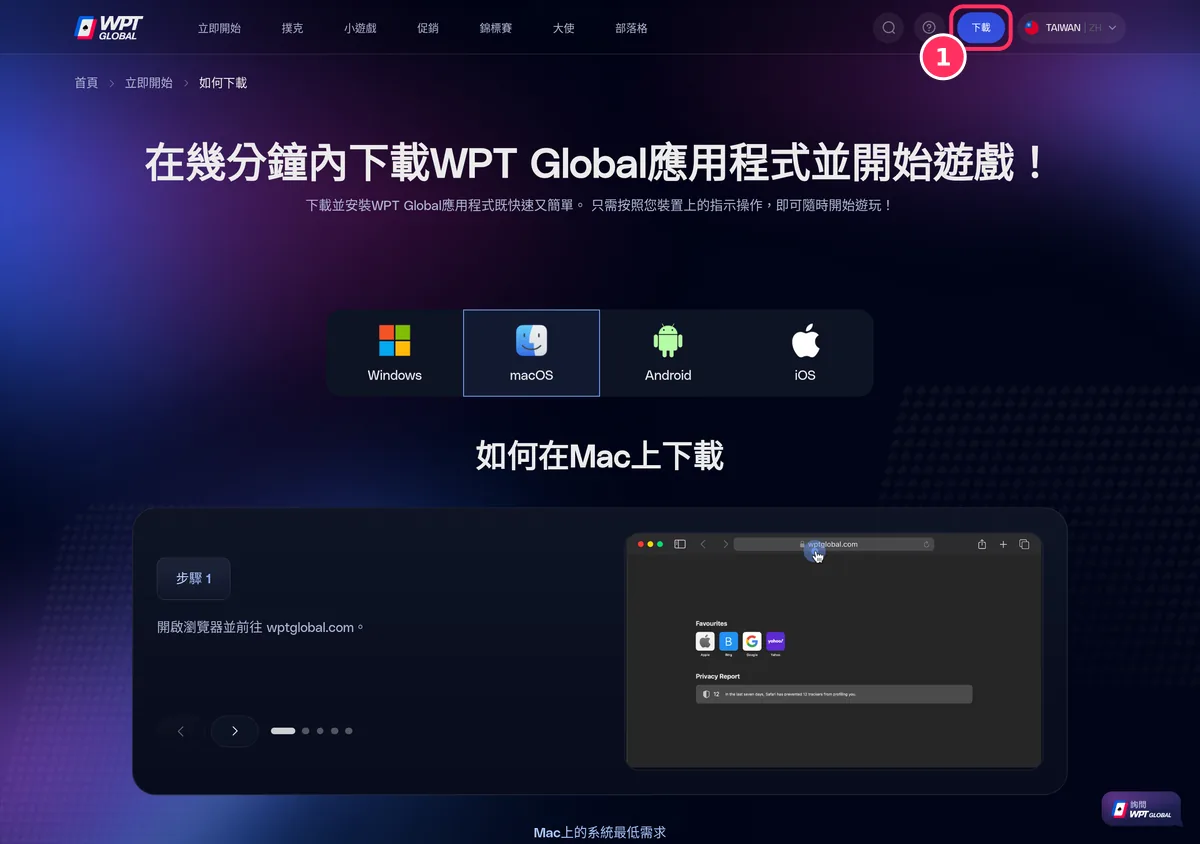
On a Mac, Download (box 1) downloads wpt-global-desktop.dmg. Step 2Drag WPT Global into Applications
The window shows the app icon and an Applications folder; drag one onto the other. Opening the app straight from that window also moves it into Applications.
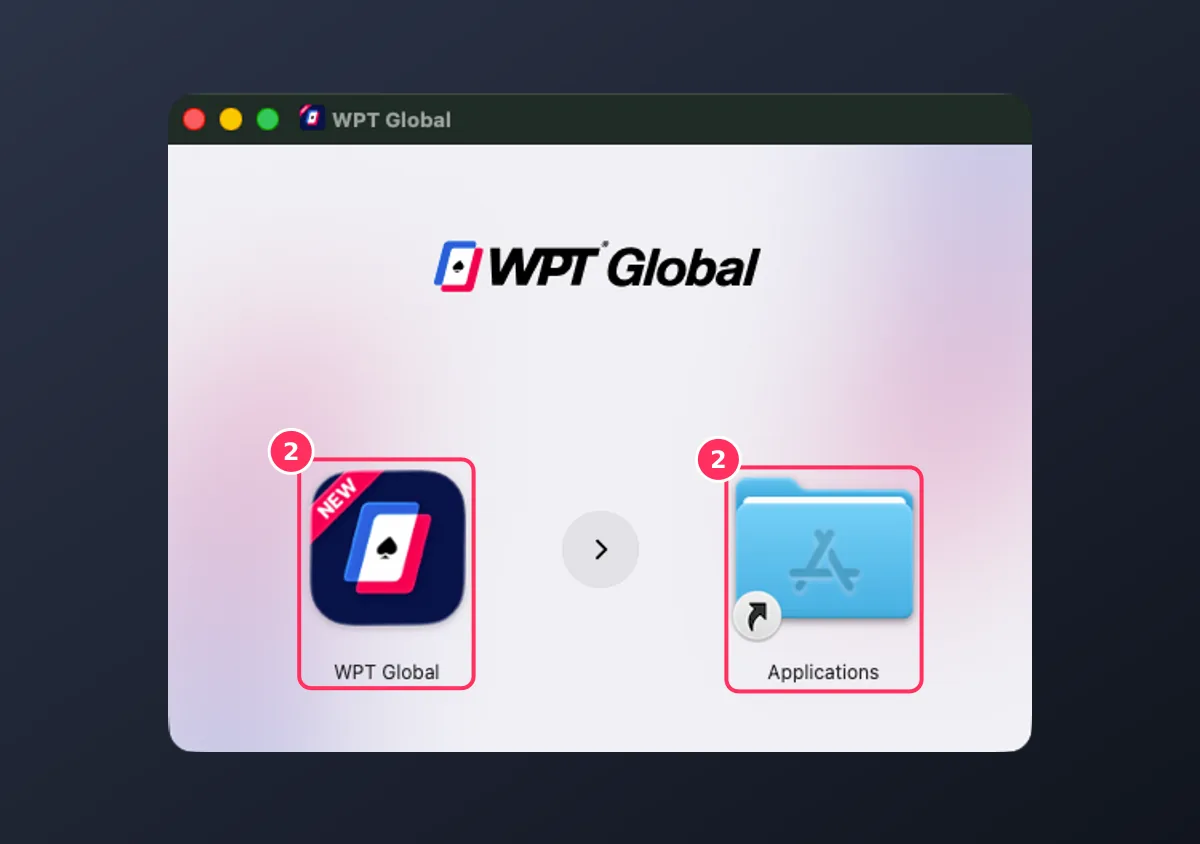
Drag the WPT Global icon (box 2, left) onto the Applications folder (box 2, right). Step 3Choose Open the first time
macOS warns that the app was downloaded from the internet; choose Open. If it is blocked, allow it under System Settings › Privacy & Security.
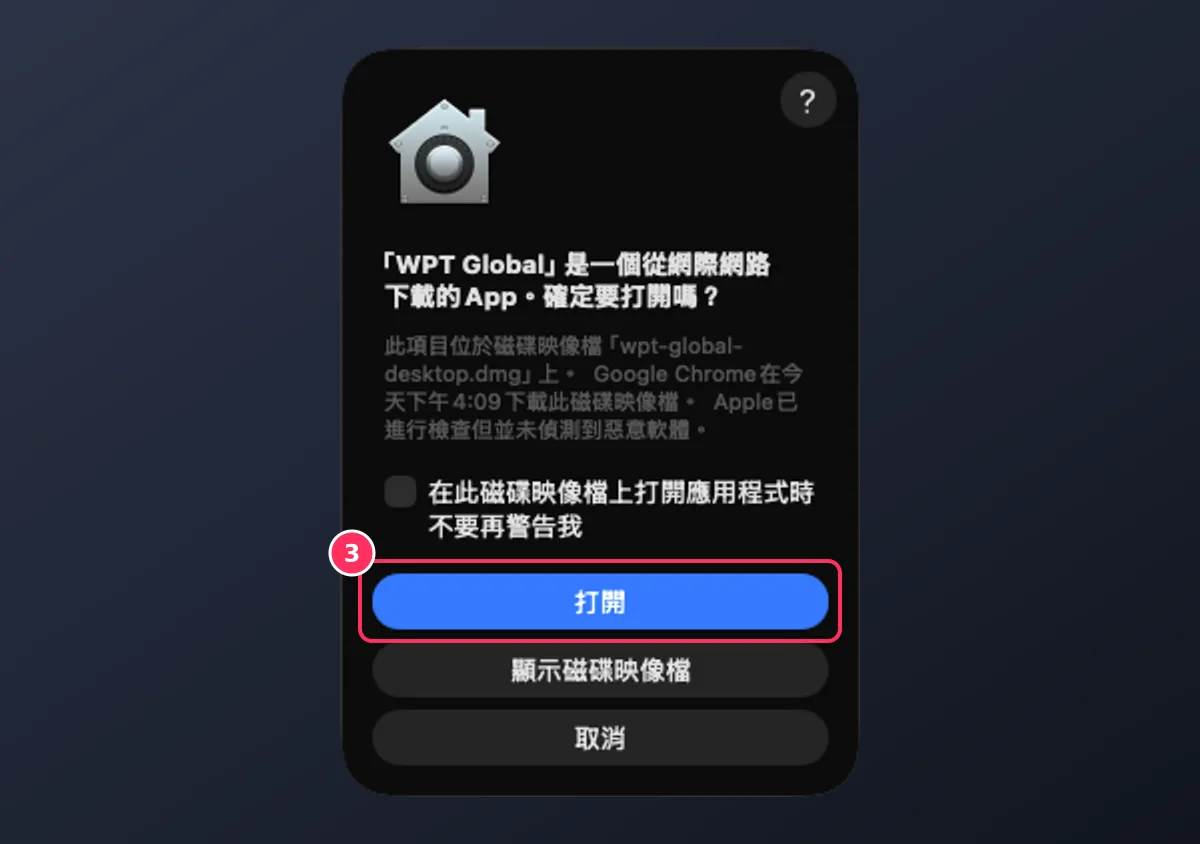
The first launch shows a macOS confirmation; click Open (box 3). Step 4Register or log in
The first launch opens a guest lobby. Choose Register to create your account and check the Referral code field, or Login if you already have an account.
The app opens in the guest lobby; tap Register, just below box 4, to create your account, or Login (box 4) if you already have one.
How can you tell a download is genuine?
Check where the file comes from. The Android APK is served from downloads.wptglobal.com, and the Windows and Mac installers from desktop.wptglobal.com, both WPT Global's own domains; the buttons on this page and the invite page's button use them. On iPhone, the App Store listing is the one to compare against. A file passed around in a forum post, a chat group or a file-sharing site may have been altered even if the name matches, so delete it rather than install it.
What if WPT Global won't install?
- Check your system version against the table above
- Free up space: the downloads range from about 281 MB to 693 MB
- Make sure the file came from an official link on this page, and delete anything from an unknown source
- Still stuck? Email WPT Global's support team; the address is in the FAQ
Once the app is installed, you need a deposit before you can play for real money. Methods and minimums are in the deposit guide, and the welcome package for your first deposit is on the welcome bonus page.
Our invite code is coming soon. Signing up through this button still gets you the official welcome package; once published, the download links from this page carry the code.
Frequently asked questions
Is the WPT Global app on Google Play?
Can I play WPT Global on an iPhone?
Can I play WPT Global in a web browser?
Is the WPT Global download free?
Can I use the same account on my phone and computer?
How much space does the WPT Global app need?
Where do I enter the referral code if I download first?
Open the official invite page and download for your device; our invite code is coming soon
Registering now still gets you the official welcome package. Once our invite code is published, every button on this site carries it automatically.
Get the WPT Global download link